

How To Create Custom Post Type in WordPress
Hello Guys, I’m not going to introduce you to WordPress here, because you know it already. So let’s focus on the task.
Today I’m sharing the article about How To Create Custom Post Type In WordPress. There are two ways of creating custom post types in WordPress
1. If you are not a programmer then you can use plugins, like Custom Post Type Ui, etc.
2. if you have coding knowledge then you can code your self.
Here I’ going to share some code for creating custom post type. And in this article, I’m creating a custom slider using the bootstrap slider and custom post type.
So lest start…
I’m sure, you already have installed WordPress and configure it. So I’m moving to the main point.
Open the function.php file from your selected theme. Add the following code.
function create_custom_slider() {
 $args = array(
        'labels'             => array('name'=>__('Sliders'), 'singular_name'=>__('Slider') ),
        'public'             => true,
        'publicly_queryable' => true,
        'show_ui'            => true,
        'show_in_menu'       => true,
        'query_var'          => true,
        'rewrite'            => array( 'slug' => 'slider' ),
        'capability_type'    => 'post',
        'has_archive'        => true,
        'hierarchical'       => false,
        'menu_position'      => null,
        'supports'           => array( 'title', 'editor', 'thumbnail','custom-fields'),
    );
    register_post_type( 'sliders', $args );
}
add_action( 'init', 'create_custom_slider' );
Look at the code, Support array contains few values that are because I just need those only. You can add more, search in WordPress official website for other parameters.
Save this file and Login to your dashboard, you can see the new menu Sliders. Click on Add New.
Write the title, if you want caption with a slider then writes some content in Editor. Add a featured image, and we will use that image for slider. You can also custom meta value from the bottom of the editor like, Read More button or link to some pages, etc.
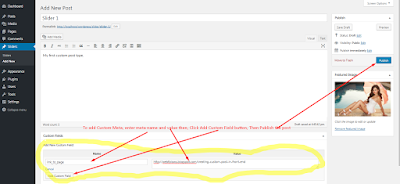
Save this file and Login to your dashboard, you can see the new menu Sliders. Click on Add New.
Write the title, if you want caption with a slider then writes some content in Editor. Add a featured image, and we will use that image for slider. You can also custom meta value from the bottom of the editor like, Read More button or link to some pages, etc.

Now we have created a slider post. Next, we will get these posts in our header file, where we are going to display the slider.
Next Open Header.php file or you can create a separate file and include that in the header where you want to display..
$args = array(
'post_type' => 'sliders',
'orderby' => 'ID',
'order' => 'DESC',
);
$sliders = new WP_Query( $args );
while ( $sliders->have_posts() ) : $sliders->the_post();
$image_link = wp_get_attachment_url( get_post_thumbnail_id($sliders->post->ID), 'full' );//get full size image
$caption = $sliders->post->post_content;
echo ' ';
if(!empty('$caption') || $caption!="") {
echo $caption;
}
//get the custom meta
$linked_page = get_post_meta($sliders->post->ID,'link_to_page',true);
endwhile;
';
if(!empty('$caption') || $caption!="") {
echo $caption;
}
//get the custom meta
$linked_page = get_post_meta($sliders->post->ID,'link_to_page',true);
endwhile;
I’ve shown you the way, now you have to walk alone. I know you can integrate Bootstrap caracole with this loop. Rest of thing is for your practice. you have an image link, next page link and caption text. Integrate and enjoy coding.
If you are facing problem then you can contact me on Google+.
Thank you.


Leave a Reply