

How To Add Custom Field/ Meta in WordPress Post / Page
Hello Guys, as you all know the WordPress is a very popular CMS, its wide features and regular updates has made our work more simple.
Today maximum of blogs has taken birth from WordPress.
So, let’s talk about how to add custom field in WordPress, here WordPress provides a feature for adding custom meta for Post/Page. Custom Meta’s are used for storing relevant information.
Here I’m going to tell How To Add Custom Field/ Meta in WordPress Post / Page for displaying Banner Image for All Post And Pages. Please read below to know how to add custom meta in WordPress.
1. Install WordPress and set up a database and user-related things.
2. Login to your Project Dashboard
3. Select your theme from Appearance -> Themes
4. Go to Post -> Add New Post

5. At the Top Right of dashboard Click on Screen Option, that will display the screen option like this, then select Custom fields. And again Click on Screen Option, look at image 2.
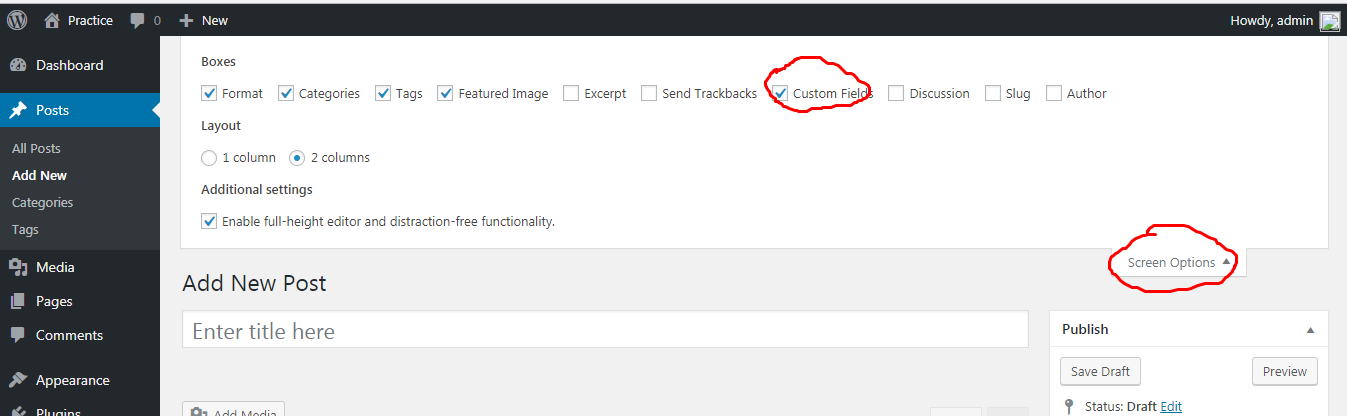
6. then scrol down the page. see this image 3.

7. Upload and image in media and copy uploaded image url from media. See image 4.

8. Paste this url in Custom field. Then save your changes.
Now the Custom field post_banner with its value has been saved. now you can get it in theme using get_post_meta() function.
get_post_meta(POST_ID, custom meta name, true );
open content.php file from your theme and write the following code where you want to display image.
 $post_banner = get_post_meta($post->ID,'post_banner',true);
 if(!empty($post_banner)):
              < img src=" $post_banner" style="width:100%"/>
 endif;
save the file and access your project via browser and you can see the image. See image 5.

Congrats ! you did it Man !
Now you can add whatever you want. Follow the same procedure for pages also.


Leave a Reply