
Press ESC to close

Manoj Bist

Display Validation Errors – Codeigniter Form Validation

Codeigniter Form Validation 

Codeigniter Form Validation
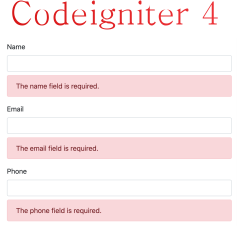
CodeIgniter provides a comprehensive data validation class that helps minimize the amount of code you’ll write.

Before explaining CodeIgniter’s approach to data validation, let’s describe the ideal scenario:

  1. A form is displayed.
  2. You fill it in and submit it.
  3. If you submitted something invalid, or perhaps missed a required item, the form is redisplayed containing your data along with an error message describing the problem.
  4. This process continues until you have submitted a valid form.

On the receiving end, the script must:

  1. Check for the required data.
  2. Verify that the data is of the correct type, and meets the correct criteria. For example, if a username is submitted it must be validated to contain only permitted characters. It must be of a minimum length, and not exceed a maximum length. The username can’t be someone else’s existing username, or perhaps even a reserved word. Etc.
  3. Sanitize the data for security.
  4. Pre-format the data if needed (Does the data need to be trimmed? HTML encoded? Etc.)
  5. Prep the data for insertion in the database.

Although there is nothing terribly complex about the above process, it usually requires a significant amount of code, and to display error messages, various control structures are usually placed within the form of HTML. Form validation, while simple to create, is generally very messy and tedious to implement.

Lets create a form like bellow:

 <form action=“/crud/add” method=“post”>
    
        <?= csrf_field() ?>
        <div class=“form-group”>
          <label for=“”>Name</label>
          <input type=“text”
            class=“form-control” name=“name” id=“” aria-describedby=“helpId” placeholder=“”>
           <small id=“helpId” class=“form-text text-muted”>Help text</small>
           <?=esc($validation->getError(‘name’))?>
        </div>

        <div class=“form-group”>
          <label for=“”>Email</label>
          <input type=“text”
            class=“form-control” name=“email” id=“” aria-describedby=“helpId” placeholder=“”>
          <small id=“helpId” class=“form-text text-muted”>Help text</small>
          <?=esc($validation->getError(’email’))?>
        </div>

        <div class=“form-group”>
          <label for=“”>Phone</label>
          <input type=“text”
            class=“form-control” name=“phone” id=“” aria-describedby=“helpId” placeholder=“”>
          <small id=“helpId” class=“form-text text-muted”>Help text</small>
          <?=esc($validation->getError(‘phone’))?>
        </div>

        <button type=“submit”  class=“btn btn-primary” btn-lg btn-block>Save</button>
    </form>

Here we have written <?=esc($validation->getError(‘phone’))?>, where esc() is global function available in codeignite to print content on view safely. And getError() is method provided by Codeigniter Form Validation library. We just password our field name in the getError() function and it will return a error attached with the field provided as parameter..

Next, create a controller like a bellow

namespace AppControllers;
use CodeIgniterController;
use AppModelsUserModel;

class Crud extends BaseController
{
    protected $rules = [];

    public function __construct()
    {
        $this->rules = [
            ‘name’ => ‘trim|required’,
            ’email’ => ‘trim|required|valid_email’,
            ‘phone’ => ‘trim|required|numeric’,
        ];
    }

    public function add()
    {
        $data[‘title’= ‘Add New User’;
        
        $validation = ConfigServices::validation();

        if$this->request->getMethod() === ‘post’ )
        { 
            $validation->setRules($this->rules);
            if( $validation->withRequest($this->request)->run() )
            {
                $user = new UserModel();
                $user->save([
                    ‘name’ => $this->request->getPost(‘name’),
                    ’email’ => $this->request->getPost(’email’),
                    ‘phone’ => $this->request->getPost(‘phone’),
                ]);
                $this->session->setFlashData(‘success’‘New User Added’);
                return redirect()->to(‘/crud’);
            }
           
        }
        $data[‘validation’= $validation;

        return view(‘add_ae’, $data);
    }
}


Here, in the construct() method, we have defined a rule set for our form to validated against the posted data. You can do the save in controller method add(), but we will be using it in the Edit method too so I defined it in the constructor. 

Then in the add() function, we created an instance of the Validation library and validated against posted data. with the Request() method validates the data with all posted fields.

and bellow it we passed the $validation instance to view file. to access error like $validation->getError( ‘ name ‘ );

Create a Model

 namespace AppModels;

 use CodeIgniterModel;

class UserModel extends Model
{
    protected $table = ‘users’;
    protected $primaryKey  = ‘id’;
    protected $allowedFields  = [‘name’,’email’,‘phone’];
    protected $returnType     = ‘object’;
    protected $useTimestamps = false;

    public function getUsers($id = false)
    {
        if ($id === false)
        {
            return $this->findAll();
        }

        return $this->asArray()
                ->where([‘id’ => $id])
                ->first();
    }
}


Just try it, you will understand it better.

Manoj Bist

A Passionate Web Developer/Designer With over 6 years of experience in the industry, Manoj Bist is a seasoned professional who combines technical expertise with a down-to-earth demeanor. As a lover of both technology and design, he thrives on creating seamless digital experiences that captivate and inspire.

Leave a Reply

Your email address will not be published. Required fields are marked *