


Hello again, Today came to share a very interesting livewire component that is the Livewire Delete Confirmation dialog. I have been searching for Confirm Action in livewire on google but not found anything, then thought, might give it a try myself and get successful and I really like the approach. You might also like the unique approach to make confirmation dialog in livewire. I specially made this confirmation dialog for the delete action.
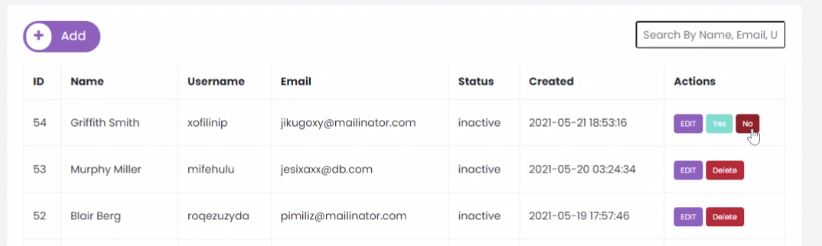
For this article, I am assuming that you already have Laravel installation with Livewire and Alpinejs installed and configured to run the project.
No problem if not installed & configured, you can do that not and proceed to further read the post.
Alpine JS required for this confirm action component.
Let’s jump to the actual point.
Making of Livewire Delete Confirmation
First, we will create a Laravel Anonymous Component and write delete confirm HTML into that file, I guess, you know about this. But if not, the Laravel Anonymous component is normal blade files that allow you to pass variables using HTML attribute and you can use it anywhere in the blades.
Things will be more clear once you see the code. Let’s Create Anonymous Component first
Navigate to resources/views/component directory, if the component directory is not available in your views directory, you can create that now. And create a blank file inside and name it delete-confirm.balde.php and copy-paste the below code.
Okay, we just create an anonymous component, now you can use this component in any livewire component delete a specific row.
In the above code, you see the $id variable, which is an ID of the row, you want to delete. We will pass the ID later.
Also, there is wire:click=”delete({{$id}})” this is the function for deleting users and you have to define this in your List Component Controller class. Bellow, we will cover that too.
Now, suppose you have a Livewire component for listing users, How would you place this blade component there, let see below. My blade file looks like this
@forelse ($userList as $user)

    {{ $user->id }}
    {{ $user->full_name }}
    {{ $user->username }}
    {{ $user->email }}
    {{ $user->status }}
    {{ $user->created_at }}

      EDIT


 @empty

     NO RECORDS

@endforelse
see this
Now you have to define a delete function in your livewire component i.e the component that is responsible for Listing users. Let’s say the component is UserList.php inside App/Http/Livewire.
Add this function to your component controller.
public function delete($id)
{
  User::findOrFail($id)->delete();
}
We are done here. We just made Delete Confirm in livewire with Alpine JS.
Thanks.


Leave a Reply